
Introduction
The Yuka app has gained massive popularity as a go-to tool for making healthier lifestyle choices. With its promise to provide detailed insights into the nutritional value and potential health risks of food and cosmetics, it has become a favorite among health-conscious individuals. In this article, we’ll explore how the app works, review its features, compare it against similar scanning apps, and assess whether it lives up to the hype.
What Is the Yuka App?
The Yuka app is a free tool designed to help users evaluate the nutritional quality and safety of food and cosmetic products. By simply scanning a product’s barcode, the app provides a score based on its ingredients, nutrient content, and potential health risks. It’s a handy companion for anyone looking to make informed decisions about what they consume or apply to their skin. Yuka was originally built for the French market and has since expanded its product database internationally, though coverage still tends to be strongest in Europe and North America.
Key Features of the Yuka App
Here are some standout features that make the Yuka app a favorite among users:
1. Barcode Scanning
The app uses a simple barcode scanning feature to quickly retrieve detailed information about a product. Whether it’s a snack or a skincare item, Yuka provides an instant evaluation. If a product isn’t in Yuka’s database yet, you can photograph the barcode, ingredient list, and nutrition label to submit it, and the app will notify you once it’s been processed.
2. Scoring System
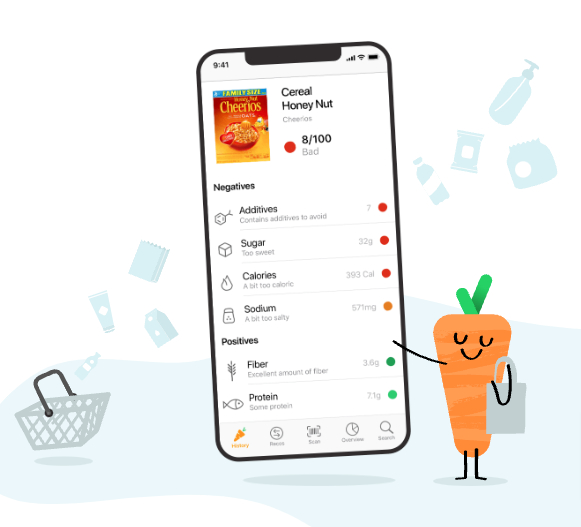
Yuka assigns products a score out of 100 based on their health impact, along with a color-coded rating: excellent, good, poor, or bad. For food products, Yuka’s own published methodology weights the score roughly as nutritional quality (around 60% of the score, based on a Nutri-Score-style calculation), the presence of additives (around 30%), and whether the product is organic (around 10%). For cosmetics, the score is based almost entirely on the risk level of the ingredients in the formulation. Because the food score leans so heavily on the nutrition and additive components, two products with similar calorie counts can land on very different scores depending on what’s in the ingredient list.
3. Product Recommendations
If a product receives a low score, Yuka offers healthier or safer alternatives in the same category, making it easy to switch to better options without having to research replacements yourself.
4. Cosmetic Safety
Beyond food, Yuka also analyzes cosmetic products to detect harmful chemicals, allergens, or irritants in their formulations, flagging ingredients linked to concerns like endocrine disruption or skin irritation based on published toxicological data.
5. Scan History and Personal Profile
The app keeps a running history of everything you’ve scanned, which is useful for comparing products over time or remembering what you liked at the store last week. You can also set dietary preferences and allergen alerts so the app highlights ingredients relevant to your specific needs.
Yuka vs. Similar Scanning Apps
Yuka isn’t the only barcode-scanning health app, and how it compares depends on what you’re trying to track:
- Yuka vs. Open Food Facts: Open Food Facts is the free, crowdsourced nutrition database that Yuka itself partly relies on for food data. The difference is presentation: Open Food Facts gives you raw data and the Nutri-Score, while Yuka translates that into a simplified 0-100 score with plain-language explanations, which is friendlier for quick decisions but offers less transparency into the underlying numbers.
- Yuka vs. INCI Beauty: INCI Beauty is a France-based competitor focused specifically on cosmetics, with a similarly detailed ingredient-risk breakdown. If cosmetics are your main concern and food scanning is secondary, it’s worth comparing both, since ingredient-risk interpretations can differ slightly between the two.
- Yuka vs. EWG Healthy Living: EWG (Environmental Working Group) covers both food and personal care products with a strong U.S. focus and a long track record of ingredient safety research. Yuka’s cosmetic database tends to be more useful outside the U.S., while EWG often has deeper data on North American brands.
- Yuka vs. reading labels yourself: None of these apps replace understanding your own dietary needs. Yuka’s score is a helpful shortcut for spotting products loaded with additives or poor nutrition, but it doesn’t account for personal medical conditions the way a dietitian’s advice would.
Benefits of Using the Yuka App
The Yuka app is not just about analyzing products; it also empowers users to make healthier choices with confidence. Here are some of its key benefits:
- Transparency: Yuka simplifies complex product labels, making it easy to understand what you’re consuming or applying.
- Healthier Habits: By identifying high-quality products, the app encourages better lifestyle choices over time as you build a habit of scanning before buying.
- Educational Insights: Users learn about additives, harmful ingredients, and the importance of nutrient balance, which builds label-reading skills you can use even without the app.
- Eco-Friendly Options: Many of the app’s recommendations include organic and environmentally friendly alternatives.
How Does Yuka Work?
Step 1: Download and Set Up
Download the Yuka app (available for iOS and Android) and set up your profile with basic preferences, such as dietary restrictions or allergens you want flagged.
Step 2: Scan Products
Use your smartphone’s camera to scan the barcode of a product. The app instantly retrieves data and assigns a score, typically within a couple of seconds if the product is already in the database.
Step 3: Review Results
Check the detailed breakdown of the product, including its nutritional value, health risks, and the specific additives or ingredients pulling the score up or down.
Step 4: Choose Better Options
Based on the app’s recommendations, you can opt for healthier alternatives to improve your overall wellness, or simply use the score as one input alongside price and personal preference.
Free vs. Premium: What’s the Difference?
Yuka’s core scanning and scoring feature is free and covers what most casual users need. The app also offers an optional paid subscription that unlocks extras like offline scanning, unlimited scan history, and support for the independent, ad-free model Yuka uses instead of accepting money from food or cosmetics brands. If you’re only scanning occasionally at the grocery store, the free version is enough; if you want to build a long-term record of what you buy or need offline access while traveling, the subscription becomes more worthwhile.
Yuka App Reviews: What Do Users Say?
Positive Feedback
Most users praise the app for its ease of use and comprehensive database. Here’s what people love:
- Quick and intuitive interface.
- Clear explanations for why a product scored the way it did, rather than just a number.
- The ability to analyze both food and cosmetic products in one app.
Constructive Criticism
While the app has many strengths, some users note areas for improvement:
- Limited product database in certain regions, especially for smaller or regional brands.
- A scoring system that may not align with specific dietary preferences, such as keto or vegan diets, since a product can score well nutritionally while still not fitting your specific diet.
- Occasional need to manually submit products that aren’t yet in the database, which takes a bit more effort than an instant scan.
Is Yuka Worth It?
The Yuka app is a solid tool for anyone looking to take more control of their health and wellness choices. Whether you’re seeking to improve your diet, avoid harmful additives, or choose safer cosmetics, Yuka offers useful insights in an easy-to-use platform. While it may not be perfect for niche diets and its database can thin out in some regions, its overall utility makes it worth trying, especially since the core feature is free.
Frequently Asked Questions
Is the Yuka app really free?
Yes, the core barcode-scanning and scoring feature is free to use. There’s an optional paid subscription for extras like offline mode and unlimited scan history, but it isn’t required to get value from the app.
Does Yuka work in every country?
Yuka’s database covers many countries, but coverage is strongest in France (where it launched), the rest of Europe, and North America. In regions with fewer users, you may scan products that aren’t yet in the database.
Is Yuka’s scoring scientifically accurate?
Yuka bases its food scores on established methodologies like the Nutri-Score system and on additive risk data from recognized food safety sources, and its cosmetic scores on published ingredient toxicology research. That said, a single score is always a simplification, and it shouldn’t replace medical or dietary advice tailored to your specific needs.
Does Yuka sell my data or take money from brands?
Yuka states that it does not accept advertising or payment from food and cosmetics manufacturers, which is part of how it positions itself as an independent source, and funds itself instead through its premium subscription.
What should I do if a product isn’t in Yuka’s database?
You can photograph the barcode, ingredients list, and nutrition facts panel directly in the app to submit it for review, and Yuka will notify you once the product has been added and scored.
Conclusion
If you’re looking for a simple yet effective way to make informed decisions about food and cosmetics, the Yuka app is a strong choice. With its user-friendly features, educational value, and independent scoring model, it’s easy to see why this app continues to gain traction with health-conscious shoppers.
Learn More: Visit the official Yuka website for further details and to download the app.

The Apps Zone is your go-to resource for discovering the best mobile apps across all categories. We provide expert reviews, tips, and recommendations to help you make the most of your smartphone or tablet. Whether you’re looking for productivity tools, entertainment options, or learning resources, we’ve got you covered!