You know that feeling when you’re trying to DM someone on X and you end up accidentally scrolling through trending topics, getting distracted by a thread, and forgetting who you were even messaging in the first place? Yeah. That’s been the X experience for a while now.
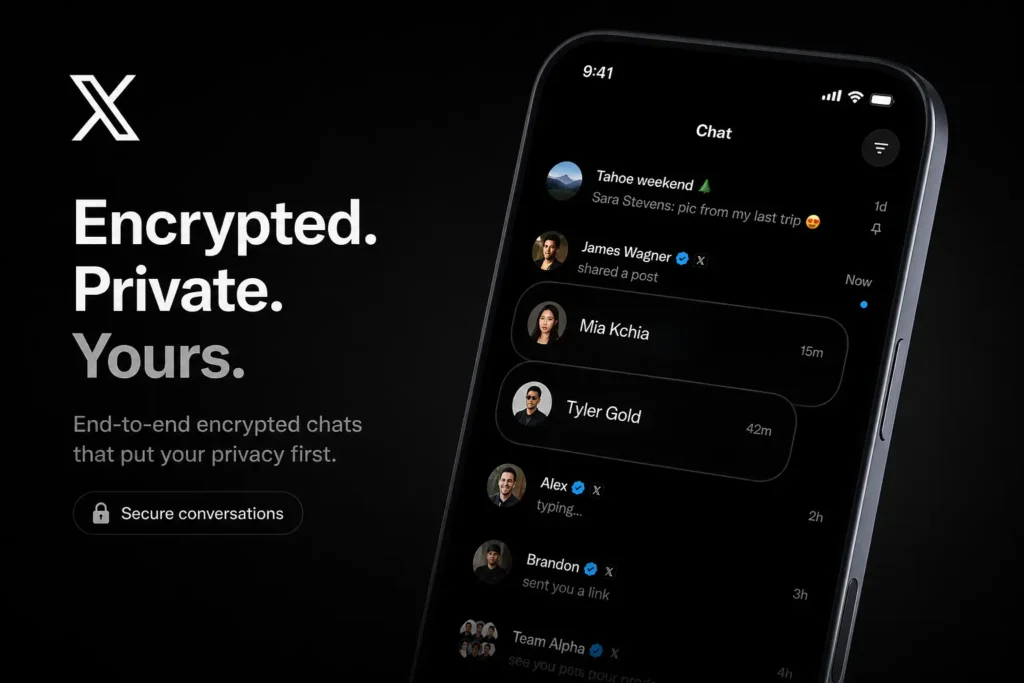
Well, X heard us. The XChat app for iPhone and iPad is officially live on the App Store — and it’s a standalone messaging app, separate from the main X platform. No timeline. No trending tabs. Just your conversations, front and centre. Let’s break down what it actually does and whether it’s worth the download.
Why XChat Is a Bigger Deal Than It Sounds
Here’s the thing: splitting messaging into its own app isn’t a new idea. Telegram built its entire identity on being a pure messaging platform. Meta did it with Messenger breaking away from Facebook. But when X does it, the stakes feel different — because X’s audience is a mix of creators, journalists, businesses, and everyday users who already live in DMs for real conversations.
The XChat standalone messaging app gives that slice of X its own space. And that matters. When your DMs are buried inside a social feed, they get treated like social media. When they have their own app, they start feeling like actual communication. That subtle shift changes how people use it — and how seriously they take it.
If you’re the type who uses X mostly to message people — whether for networking, collaborating, or just chatting — this app was basically made for you. And if you’ve been looking for ways to build a smarter daily app setup, XChat deserves a spot in that lineup.
What XChat Actually Brings to the Table
Let’s get into the features — because “standalone messaging app” can mean anything from a bare-bones chat window to a fully loaded communication suite. XChat lands somewhere genuinely interesting in that range.
The app supports real-time direct messaging with a cleaner, faster interface than what you get inside the main X app. Conversations load quicker, the layout feels less cluttered, and you’re not fighting the algorithm for your own inbox. That alone is a win.
Beyond the basics, here’s what users are getting with the XChat app download:
- End-to-end encrypted DMs — rolling out for eligible conversations, bringing XChat closer to privacy-first alternatives
- Media sharing — photos, videos, and links with in-app previews, no need to leave the conversation
- Group messaging — create group chats directly from XChat without needing the main X app open
- Notification controls — granular settings so you only get pinged for what actually matters to you
One thing worth noting: your X account is your XChat account. No separate signup, no new username. If you already have X, you’re already in. That frictionless entry is smart — it removes the biggest barrier to adoption.
How to Download XChat Messaging App on iPhone Right Now
This is the part people actually need — not just the “it’s available” headline, but the actual steps. So here’s exactly how to download XChat messaging app on iPhone or iPad.
Open the App Store on your device and search for XChat. You’re looking for the app published by X Corp — make sure you’ve got the right one before tapping download, since there are older third-party apps with similar names floating around the store. Tap Get, authenticate with Face ID or your Apple ID password, and let it install.
Once it’s open, sign in with your existing X account credentials. Your full DM history syncs over immediately — nothing gets lost, nothing resets. The app is optimised for both iPhone and iPad, so whether you’re on a compact screen or a larger display, the layout adjusts properly. Apple device users across both form factors are covered from day one, which is a good sign that X actually put thought into the iPad experience instead of just stretching the phone version.
If you want to keep your phone running smoothly after adding new apps to your stack, it’s worth checking out apps that help you monitor and optimise your smartphone performance — especially if you’re on an older device.
Where XChat Gets Really Interesting — And Where It Could Go
Here’s my honest take: XChat’s current feature set is solid but not revolutionary. What makes it exciting isn’t what it does right now — it’s the direction it’s clearly heading.
X has been building toward becoming a “super app” for a while. Payments, long-form content, audio conversations — all of it pointing to a platform that wants to be more than a social feed. A dedicated messaging layer is the piece that ties that together. Because if XChat evolves to support business messaging, customer support threads, or even integrated payments within conversations, it stops being “X’s version of Telegram” and starts becoming something with its own gravity.
The privacy angle is also worth watching. End-to-end encryption in DMs has been a long-standing ask from power users. The fact that XChat is launching with that feature — even in limited rollout — suggests X is taking the trust problem seriously. Whether that continues as the app scales is the real question, but the signal is there.
And let’s be honest: the messaging app space is brutal. Telegram has loyal power users, iMessage has iOS lock-in, and WhatsApp has sheer network effect. XChat doesn’t need to beat all of them — it just needs to be the best place to talk to the people you already follow on X. That’s a much more achievable goal, and right now, it’s doing that job well.
If you’re into tracking the best new apps as they drop, you’ll also want to keep an eye on our roundup of how to get the most out of your smartphone in 2026 — because the apps you choose genuinely shape your experience.
Should You Actually Use XChat? Here’s My Take
If you’re a regular X user who messages people on the platform — yes, download it today. The cleaner interface alone makes it worth it. Getting your DMs out of the main feed reduces distraction and makes you more likely to actually respond to people.
If you barely use X DMs and your main messaging happens on other platforms, this probably won’t change your habits overnight. But it’s still worth having installed — especially as features continue to roll out over the coming months.
For creators and professionals who use X for networking, XChat might genuinely become your most-used communication tool. The combination of a clean UI, encrypted messaging, and group chats — all tied to your existing X identity — is a package that makes sense. And unlike starting from scratch on a new platform, you already have your network there.
The X messaging app download takes about thirty seconds. Your contacts are already waiting. The only question is whether you’re going to keep burying your DMs inside the main app or give them the dedicated space they deserve.
Try it out and let me know what you think in the comments — I’m genuinely curious whether it sticks for people or ends up being another app sitting on page three of your home screen. My bet? This one earns its place.

The Apps Zone is your go-to resource for discovering the best mobile apps across all categories. We provide expert reviews, tips, and recommendations to help you make the most of your smartphone or tablet. Whether you’re looking for productivity tools, entertainment options, or learning resources, we’ve got you covered!